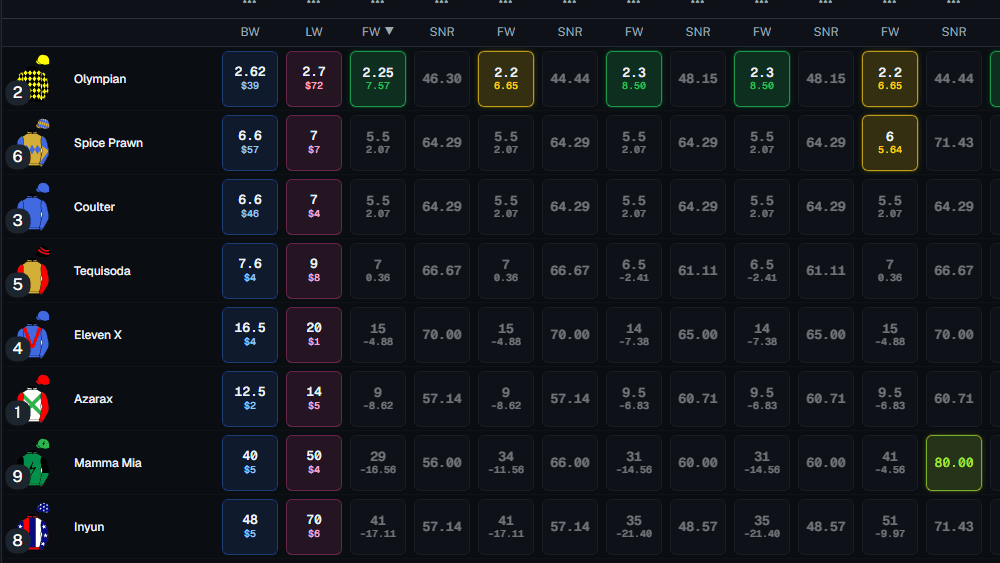
If you use a browser extension to compare odds or calculate fair value, your tool is slower than the market. Not occasionally. Systematically.
The extension scrapes prices from bookie websites one tab at a time. It runs on your laptop. It breaks when bookies update their HTML. It dies when you close your browser. And it cannot follow you to your phone.
But the worst part is something most bettors do not know about: Chrome throttles inactive tabs. The moment you click away from a scraping tab to place a bet, the extension's data source slows to a crawl. On a low-RAM machine, Chrome suspends the tab entirely. Your odds go stale while you are still staring at them.
This is not a bug. It is the architecture. And it is why every extension-based odds tool — no matter how well built — will always lag behind a server-side fair odds terminal.
Here is how the two approaches actually work, why the difference matters for your edge, and what to look for when you choose your next tool.
How Browser Extensions Scrape Odds
A typical Chrome extension workflow looks like this:
- The extension opens hidden tabs for each bookie website.
- It injects JavaScript into those tabs to read the DOM.
- It extracts price data from specific HTML elements.
- It sends that data to a background script, then to a popup or dashboard.
- You see the price in your comparison grid.
This works, until it does not.
The Problems
Latency is stacked. The extension must load a full webpage for every bookie, wait for the JavaScript to render, then parse the DOM. That is 2–5 seconds per bookie, best case. With 10 bookies, you are looking at 20–50 seconds for a single refresh cycle. In racing, fair odds can move in seconds.
Breakage is constant. Bookies change their site structure weekly. A class name shifts, a div reorders, and the extension cannot find the price. The developer pushes a fix. You wait for the Chrome Web Store to approve it. Your edge disappears in the meantime.
Mobile is impossible. Chrome extensions do not run on iOS or Android. If you leave your laptop, you leave your tool.
Your laptop is the bottleneck. The extension consumes RAM, CPU, and bandwidth. Open 15 bookie tabs and your fan spins up. Close the browser to save battery, and the scraping stops.
Chrome Tab Throttling: The Hidden Killer
Here is what most extension users do not realise. Since Chrome 88, Google introduced aggressive tab throttling for background tabs. If a tab is not actively visible, Chrome:
- Limits JavaScript timers to firing once per minute
- Delays network requests
- Reduces CPU allocation
- On memory pressure, suspends the tab entirely
What does this mean for your odds extension?
You open the extension dashboard. It shows prices. You switch to the bookie tab to place a bet. The scraping tab goes to the background. Chrome throttles it. The extension stops receiving fresh data. You place your bet based on a price that stopped updating 45 seconds ago.
By the time you switch back to the extension, Chrome wakes the tab. It refreshes. The price has moved. Your edge is gone. You backed at $3.50. The fair odds shifted to $3.30 while your tab was throttled.
Low RAM Makes It Worse
On a machine with 8GB of RAM or less, Chrome's tab discarding kicks in hard. When memory runs low, Chrome:
- Discards the least-recently-used tabs
- Reloads them from scratch when you return
- Loses all unsaved JavaScript state
For an odds extension, this means:
- Your scraping tabs get discarded
- When you switch back, they reload from scratch
- The DOM re-renders, the extension re-parses, the data re-flows
- 10+ seconds of dead time while your tabs wake up
- During a Saturday race day, this happens repeatedly
A bettor on a budget laptop with 4GB RAM is effectively blind for 30–60 seconds out of every few minutes. The systematic bettor with a server-side terminal sees every tick. The extension user sees what Chrome decides to show them.
How Server-Side Streaming Works
A server-side fair odds terminal uses a fundamentally different model:
- The terminal maintains direct data connections to every bookie and Betfair from a central server.
- Price changes arrive as they happen.
- The server normalises, deviggs, and calculates fair odds in real time.
- Your grid receives updates via a persistent WebSocket connection.
- New fair odds and EV% calculations appear in under half a second.
No browser tabs. No DOM scraping. No local processing. The server does the heavy lifting. Your device is just a viewport.
Why It Is Faster
Sub-second ticks. Because the server listens for price changes directly, it receives them as soon as the bookie or exchange publishes them. The 0.4-second tick you see in the grid is the round-trip from server to screen — not the round-trip from your laptop to 15 bookie websites and back.
No Chrome throttling. The server does not run in a browser tab. It runs on infrastructure built for streaming. Your phone or laptop is just a viewport. Switch apps, switch tabs, lock your screen — the server keeps streaming. When you return, the grid shows the latest data instantly.
No RAM issues. The server handles parsing, devigging, fair odds calculation, and EV% computation. Your device loads one lightweight web page. A phone with 2GB RAM runs it fine. A laptop with 4GB RAM runs it fine. The server does the work.
No breakage on bookie updates. When a bookie changes its site, the server integration is updated centrally. You do not download a new extension. You do not wait for approval. The fix is deployed and your fair odds grid keeps streaming.
Works on any device. Your phone, tablet, and desktop all connect to the same server. The fair odds are identical. The speed is identical. The alerts are identical.
A Side-by-Side Comparison
| Factor | Browser Extension | Server-Side Terminal |
|---|---|---|
| Refresh speed | 20–50 seconds (all bookies) | 0.4 seconds per tick |
| Chrome tab throttling | Yes — background tabs throttled to 1 update/minute | No — server streams independently |
| Low RAM behaviour | Tabs discarded, full reload required | No impact — viewport only |
| Breaks on bookie updates | Yes, frequently | No, central fix |
| Works on mobile | No | Yes, any browser |
| Works when tab is backgrounded | No | Yes |
| Device load | High (RAM, CPU, tabs) | Minimal (viewport only) |
| Alert reliability | Depends on tab staying open | Server-fired, always on |
| Install required | Chrome extension | None, web-native |
| Fair odds calculation | Manual / spreadsheet | Automated, real-time |
The gap is not marginal. It is an order of magnitude.
What This Means for Your Betting
An extension-based tool gives you prices from 10+ seconds ago — if your tabs are even active. A server-side terminal gives you fair odds from 0.4 seconds ago, regardless of what you are doing on your device.
In practice, that gap determines whether you:
- See a fair odds shift before you act, or after
- Catch a soft corporate line before it corrects, or miss it
- Get your Betfair trade matched at the right price, or watch it drift
- Place a bet based on live data, or based on a throttled tab that stopped updating
Systematic bettors do not trade on stale data. They trade on the fastest reliable signal they can access.
The Hidden Cost of "Free" Extensions
Many matched betting and odds tools use extensions because they are cheap to build and distribute. The cost is passed to you in other ways:
- Missed edges: Slow refresh cycles + tab throttling mean you see fewer +EV opportunities.
- Maintenance downtime: Every bookie update is a potential outage.
- Desktop lock-in: You cannot calculate fair odds unless you are at your laptop.
- RAM dependency: Your tool's reliability is tied to your computer's specs. A $2,000 laptop runs better than a $500 one — for no good reason.
- Privacy risk: Extensions read every page you visit, not just bookie tabs.
- Manual calculation: Extensions scrape raw odds. You still need a spreadsheet to devig and calculate fair value.
A server-side fair odds terminal costs more to build and run. That is why most competitors do not offer one. But the speed, reliability, independence from your device's specs, and automated fair odds calculation are non-negotiable for bettors who treat EV as a system.
How to Tell Which Architecture a Tool Uses
If the provider does not say, look for these clues:
- Do they ask you to install a Chrome extension? → Client-side scraping.
- Does the tool get slower or freeze when you switch tabs? → Chrome throttling is killing it.
- Does it perform worse on an older laptop? → RAM-dependent scraping.
- Does the tool stop working when you close your browser? → Client-side scraping.
- Can you use it on your phone without an app? → Likely server-side.
- Does it advertise a specific tick speed (e.g., "0.4s")? → Likely server-side.
- Does it calculate fair odds automatically, or do you export to a spreadsheet? → Server-side if automated.
- Are updates announced as "extension updated to v2.3"? → Client-side scraping.
If speed and fair odds accuracy matter to your bottom line, the architecture is not a detail. It is the product.
Experience 0.4s Fair Odds on Any Device
You do not need to understand WebSockets or DOM parsers to feel the difference. Open a terminal that streams fair odds server-side and compare it to your current extension workflow. The speed gap is immediate. The reliability gap — especially on a low-RAM machine or when you switch tabs — becomes obvious within a day.
Start your 7-day free trial — See 60+ bookies, Betfair back/lay/midpoint, and devigged corporate averages stream in real time on any device. No extension. No installs. No tab throttling. No lag.
Or open the grid free with Promo View and feel the difference for yourself.